Paytia Proxy Gateway
Technical Overview, Configuration, and Test Guide
1. Overview
The Paytia Proxy Gateway is a flexible payment gateway that enables organisations to securely pass captured payment data from their environment to third-party systems using a fully customisable JSON payload.
Instead of hard-coding payment fields or adapting your application to a fixed gateway schema, the Proxy Gateway allows you to define exactly what data Paytia posts, where it is posted, and how it is structured.
Sensitive card data is injected at runtime using secure variable replacement, ensuring cardholder data is never exposed to your systems or users.
2. Key Capabilities
Secure capture and handling of card data
Runtime variable substitution for sensitive fields
Fully customisable JSON metadata structure
Support for authenticated outbound API calls
Optional encryption of outbound payloads
Reduced PCI-DSS scope by removing card data handling from your environment
Compatible with CRMs, ERPs, donation platforms, and bespoke APIs
3. Supported Sensitive Data Variables
The following variables are supported and must be used exactly as shown. Paytia replaces these values at runtime after secure card capture.
| Field Name | Variable | Description |
|---|---|---|
cardNumber | {{PAN}} | Primary Account Number |
expiryDate | {{EXPDATE}} | Card expiry date |
cardsecuritycode | {{CVV}} | Card Security Code (CVV / CVC) |
financialInstitution | {{CARDBRAND}} | Card brand (VISA, MASTERCARD, etc.) |
These variables can be placed anywhere within the metadata JSON structure.
4. Gateway Availability
The Proxy Gateway is:
Included in supported Paytia packages by default
Or available as an additional gateway on request
Once enabled, configuration is performed through the Paytia Administration Portal.
5. Authentication Configuration
To allow Paytia to authenticate with your receiving system, authentication settings must be configured.
Navigation Path
Login as an Administration user
→ Settings
→ Auth Configuration
Configuration Page URL
https://{subdomain}.paytia.com/portal/merchant/authconfiguration
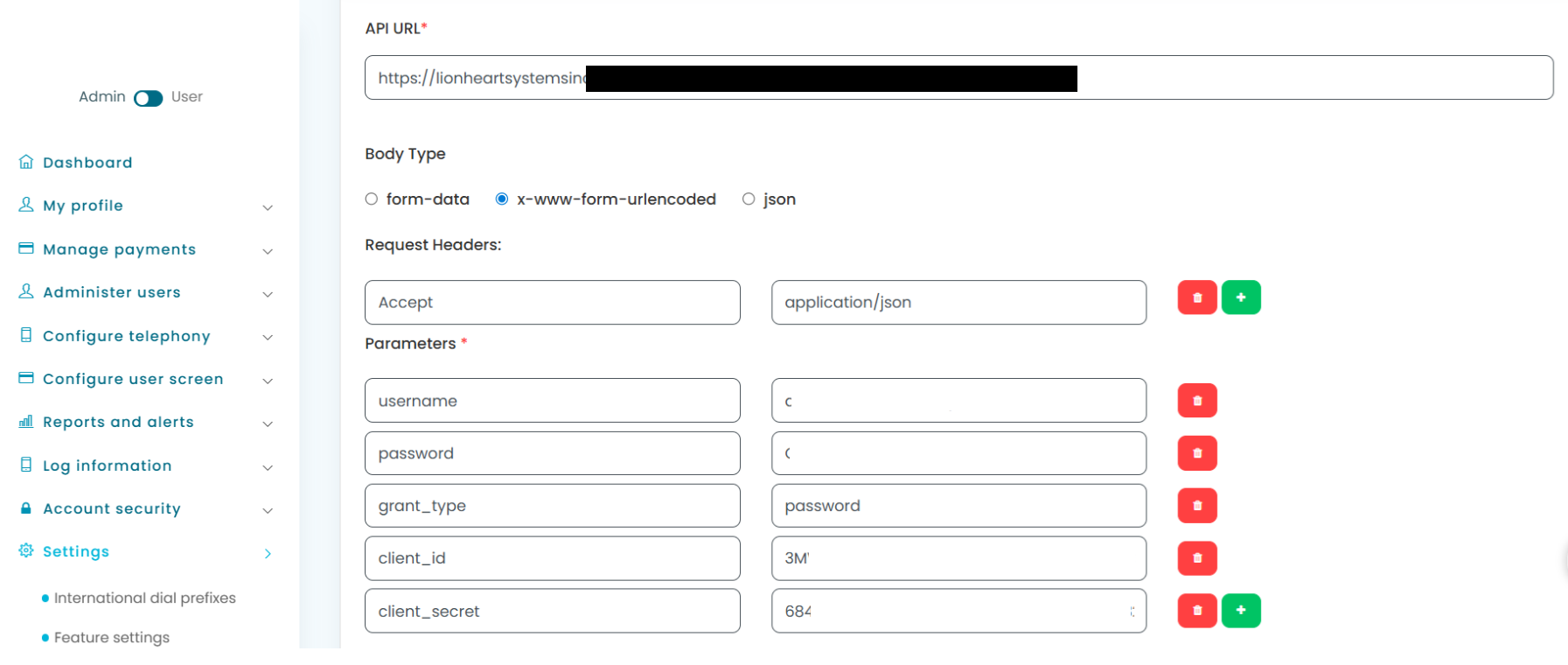
Authentication Parameters Example
API URL
Body Type Options
form-data
x-www-form-urlencoded
json
Request Headers
| Key | Value |
|---|---|
| Accept | application/json |
Parameters
| Key | Value |
|---|---|
| username | your-api-username@your-domain.example |
| password | ******** |
| grant_type | password |
| client_id | ******** |
| client_secret | ******** |
Credentials should be securely stored and rotated in line with your security policy.
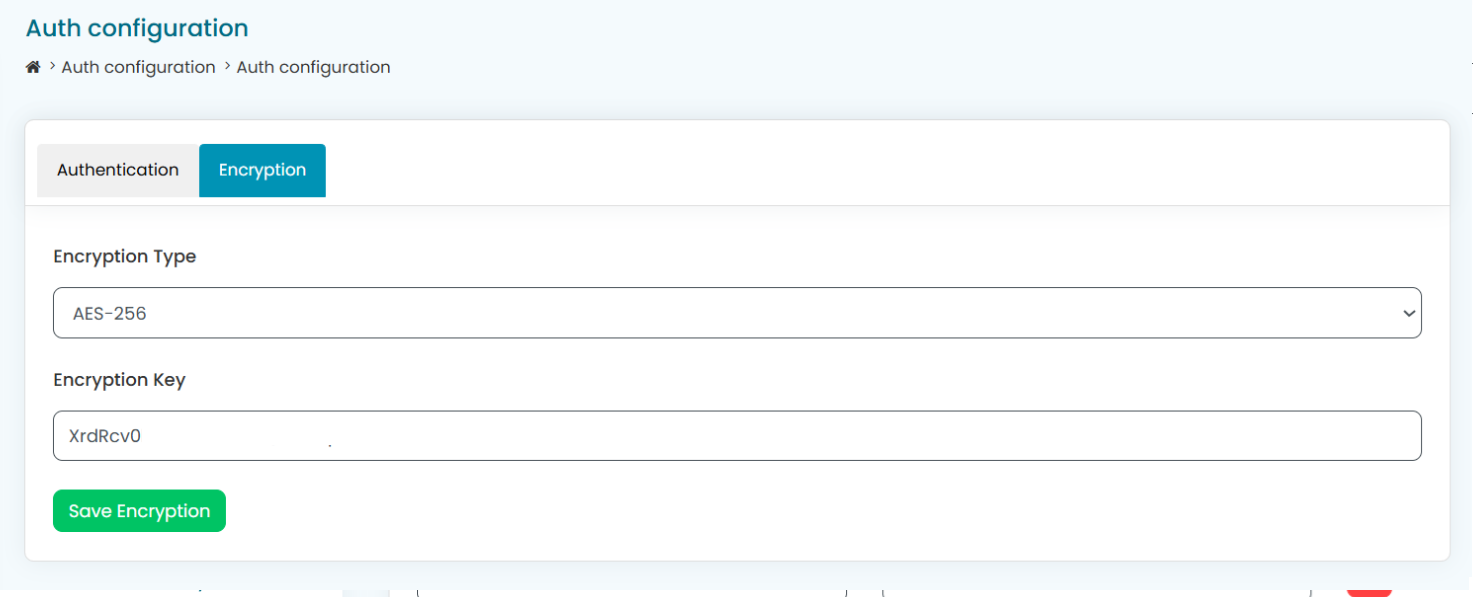
6. Encryption Configuration
Outbound payloads can be encrypted before being posted to the target system.
Supported Encryption Types
AES-256
RSA
BCRYPT
JWT
Example Encryption Settings
Encryption Type: AES-256
Encryption Key:
XrdRcv0bfY95mMAAAAAAAAAAAAAAvOHcZvF4zoXzE7d
The receiving system must be able to decrypt the payload using the same method and key.
7. PSP Post URL Configuration
This defines the endpoint that will receive the completed payload after variable substitution and encryption.
Field Name: psp_posturl
Example
https://qxAAAAAAA98AAAA.execute-api.us-east-1.amazonaws.com/AAAA5
8. Metadata Payload Structure
The metadata field contains the entire JSON payload that Paytia will post to your endpoint. This structure is fully controlled by you.
Example Metadata (JSON)
{
  "programId": "a0X000000EXAMPLE1",
  "sourceCC": "Phone Order",
  "sourceDetail": "Call Centre",
  "sourceName": "ExampleCo",
  "contactInfo": {
    "firstName": "Alex",
    "lastName": "Morgan",
    "email": "alex.morgan@example.com",
    "primaryPhone": "+1-555-0100",
    "secondaryPhone": "",
    "mobilePhone": "",
    "birthdate": "2001-01-01",
    "address": {
      "streetAddress": "100 Example Street",
      "postalCode": "A1B 2C3",
      "city": "Exampleton",
      "country": "GB",
      "state": "CA-AB"
    }
  },
  "paymentInfo": {
    "encryption": "aes256",
    "cardNumber": "{{PAN}}",
    "expiryDate": "{{EXPDATE}}",
    "cardsecuritycode": "{{CVV}}",
    "financialInstitution": "{{CARDBRAND}}",
    "type": "Credit Card",
    "address": {
      "streetAddress": "100 Example Street",
      "postalCode": "A1B 2C3",
      "city": "Exampleton",
      "country": "Canada",
      "state": "CA-AB"
    }
  },
  "orderInfo": {
    "orderType": "Regular Order",
    "totalOrderAmount": 25,
    "currency": "CAD",
    "waitlist": false,
    "membership": false,
    "mailTickets": false,
    "gift": false,
    "group": false,
    "additionalTicketHolder1": "",
    "additionalTicketHolder2": "",
    "additionalTicketHolder3": "",
    "orderLineItems": [
      {
        "quantity": 1,
        "packId": "a0X000000EXAMPLE2",
        "amount": 25,
        "isBundle": false
      }
    ]
  },
  "marketingInfo": {
    "textOptIn": false
  }
}
9. cURL Request for Testing
The following cURL example demonstrates how to submit a test transaction to the Paytia Proxy Gateway API.
curl --location 'https://accounts.paytia.com/portal/api/payment_service' \
--header 'X-API-KEY: 5aAAAA287f5712adAAAAAAAAAAAAAAA41522c05cbf5dc9aeede05ddfec1d3' \
--form 'reference_id="BT202968"' \
--form 'amount="10.00"' \
--form 'agent_id="10000"' \
--form 'firstname="Thirdpartytwo"' \
--form 'lastname="User"' \
--form 'billingcountry="GB"' \
--form 'billinghouseno="12"' \
--form 'billingcity="Southampton"' \
--form 'billingpostcode="302020"' \
--form 'shippingcountry="GB"' \
--form 'shippingfirstname="fsdffd"' \
--form 'shippingcity="Southampton"' \
--form 'shippinghouseno="44"' \
--form 'shippingpostcode="302020"' \
--form 'transaction_flag="0"' \
--form 'web_agent_form="1"' \
--form 'start_date="2025-10-15"' \
--form 'intervalcount="3"' \
--form 'end_date="2025-11-06"' \
--form 'subscription_amount="12"' \
--form 'interval="daily"' \
--form 'billingstate="fgfdgfdgfdgfggd"' \
--form 'country_phonecode="IN"' \
--form 'phone_number="5550100"' \
--form 'email_address="test.customer@example.com"' \
--form 'merchantcode="Proxy payment gateway"' \
--form 'shippingdescription="ewewqewqed"' \
--form 'customer_landlinecode="GB"' \
--form 'customer_landline_number="5550101"' \
--form 'account_number="998877665544332211"' \
--form 'billingdescription="Description"' \
--form 'psp_posturl="https://qxAAAAAAA98AAAA.execute-api.us-east-1.amazonaws.com/AAAA5"' \
--form 'metadata="{\"programId\":\"a0X000000EXAMPLE1\",\"sourceCC\":\"Phone Order\",\"sourceDetail\":\"Call Centre\",\"sourceName\":\"ExampleCo\",\"contactInfo\":{\"firstName\":\"Alex\",\"lastName\":\"Morgan\",\"email\":\"alex.morgan@example.com\",\"primaryPhone\":\"+1-555-0100\",\"birthdate\":\"2001-01-01\",\"address\":{\"streetAddress\":\"100 Example Street\",\"postalCode\":\"A1B 2C3\",\"city\":\"Exampleton\",\"country\":\"GB\",\"state\":\"CA-AB\"}},\"paymentInfo\":{\"encryption\":\"aes256\",\"cardNumber\":\"{{PAN}}\",\"expiryDate\":\"{{EXPDATE}}\",\"cardsecuritycode\":\"{{CVV}}\",\"financialInstitution\":\"{{CARDBRAND}}\",\"type\":\"Credit Card\"}}"'
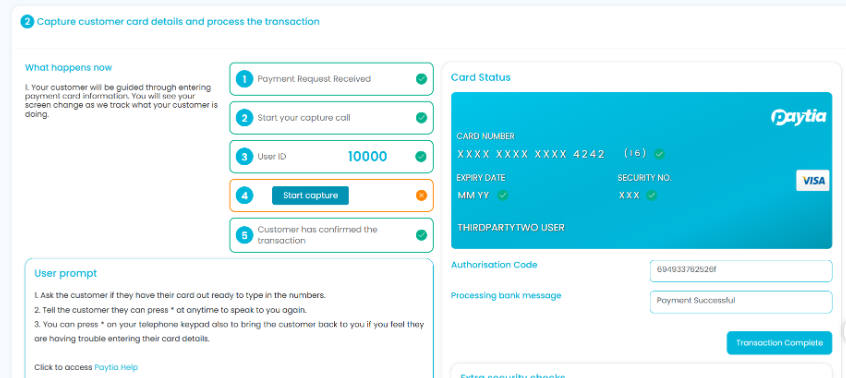
10. Card capture in real-time.
11. Security and Compliance Notes
Card data is never exposed to your application or staff
Sensitive values are injected only at the point of secure transmission
Encryption is applied before data leaves Paytia
Reduces PCI-DSS scope and compliance burden
Fully aligned with Paytia’s PCI-DSS Level 1 service provider controls
12. Summary
The Paytia Proxy Gateway is designed for organisations that need maximum control with minimum risk. By separating card capture from payload design, it enables secure, compliant, and highly adaptable payment integrations across complex system environments.
If you need a gateway that fits your systems — rather than forcing your systems to fit a gateway — the Proxy Gateway delivers that flexibility securely and at scale.